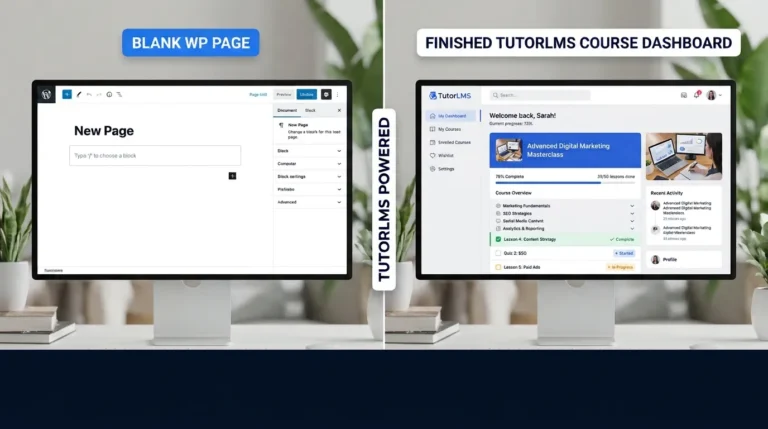

Ever wanted to sell your knowledge online? Maybe you know how to design websites, teach English, cook Bengali food, or run a fitness plan. A WordPress site with a course system can turn that knowledge into income.
The problem is choice. There are many learning management system (LMS) plugins for WordPress, and they all promise to be easy. Most reviews are either too short or written like ads.
In this post, I look at Tutor LMS in a simple way. I cover what it does, what it costs in 2026, where the AI tools fit in, and who should or should not buy it. By the end, you will know if it is a good first choice for your course.
Let’s start.
Quick Verdict: Should You Buy Tutor LMS?
Here is the short answer before the details.
| Question | Answer |
|---|---|
| Is it good for a first course? | Yes. The setup is simple and the course builder is easy to learn. |
| Can I start for free? | Yes. The core plugin is free to use on WordPress. |
| How much does a paid plan cost? | The Individual plan starts at $199 per year at regular price. |
| Does it take a cut of my sales? | No. Tutor LMS says it does not take a percentage of your course revenue. |
| Is there a refund option? | Yes. There is a 30-day money-back guarantee on paid plans. |
| Is it best for everyone? | No. Big businesses or people who want an all-in-one hosted platform may prefer other tools. |
My overall take: Tutor LMS is one of the most practical options for people who already have a WordPress website. It is simple for beginners and powerful enough for growing course sellers. The AI tools are useful, but you need your own OpenAI API key to use them, which adds a small extra cost.
Check current Tutor LMS pricing here
What Is Tutor LMS?
Tutor LMS is a WordPress plugin. It turns your WordPress site into a place where you can:
- Create online courses with lessons, videos, and files
- Add quizzes and assignments
- Sell courses, bundles, and memberships
- Track student progress
- Issue certificates
- Run live classes with tools like Zoom, Google Meet, or Jitsi
It is built by the team behind Themeum. The company says it has helped more than 100,000 educators, and it has a large community of users on Facebook and YouTube.
Because it runs inside WordPress, you do not need to move your course to a new platform. Your website, your blog, your course, and your sales can all live in one place. This is the main reason people choose it.
Who Is Tutor LMS Best For?
Tutor LMS fits well for:
- Solo course creators who want to sell their own courses
- Bloggers and website owners who want to add a course section to an existing site
- Freelancers and coaches who sell training or consulting sessions
- Small academies and tutoring businesses that need quizzes and student tracking
- Agencies that build learning sites for clients
- Nonprofits and community groups that teach free or low-cost classes
Tutor LMS may not be the best fit for:
- People with no WordPress experience who want everything fully hosted and done for them. A hosted platform like Teachable or Kajabi may feel easier at first, although they usually cost more.
- Very large schools that need complex enterprise features, such as deep HR integrations.
- Anyone who does not want to manage a website. You still need hosting, a domain, and basic updates.
Tutor LMS Pricing in 2026
Pricing is the first thing most people ask about, so let’s go through it clearly. The prices below are from the official Tutor LMS pricing page when I checked it. Prices may change, and a sale may be running, so always check the page before you buy.
Yearly Plans
| Plan | Sites allowed | Regular price per year | Price during the current sale (at time of checking) |
|---|---|---|---|
| Individual | 1 site | $199.00 | $139.30 |
| Business | Up to 10 sites | $399.00 | $279.30 |
| Agency | Unlimited sites | $799.00 | $559.30 |
Lifetime Plans
| Plan | Sites allowed | Regular one-time price | Price during the current sale (at time of checking) |
|---|---|---|---|
| Individual | 1 site | $499.00 | $424.15 |
| Business | Up to 10 sites | $999.00 | $849.15 |
| Agency | Up to 50 sites | $1,999.00 | $1,699.15 |
What this means for you:
- If you are building your first course on one site, the Individual plan is the most likely choice.
- If you pay yearly, you keep getting updates for one year. You can renew to keep updates going.
- If you prefer one payment and plan to use the site for years, the lifetime Individual plan may save money over time. Do the math with your own timeline.
- The Business plan makes sense if you run several sites, or if you work as a freelancer for clients.
All paid plans include all Pro add-ons and features, unlimited courses and users, and Pro themes. Priority support is included too.
Tip: The current sale is a limited offer. Check the page on the day you buy. Also, the pricing page lists prices in USD and excludes VAT and taxes. Your final price may be a little higher depending on where you live.
See all Tutor LMS plans and prices
Free Version vs Pro: What Is the Difference?
Tutor LMS offers a free plugin that you can download from WordPress.org. The company says the full core of Tutor LMS is free forever. This is great for testing the system before you spend money.
Use the free version if you:
- Want to build a simple course for free
- Need to learn how the course builder works
- Are not ready to sell yet
Upgrade to Pro if you need:
- Paid course sales and checkout
- Advanced quiz types, such as image pinning, drawing, and puzzles
- Certificate builder features
- Course bundles, subscriptions, and memberships
- AI Studio
- Priority support and automatic updates
- Advanced reports and analytics
The free plugin is useful for learning. Most people who want to earn money from their courses will need a paid plan.
Key Features of Tutor LMS (Explained Simply)
Below are the features that matter most for a first course. I have grouped them so they are easy to scan.
1. Drag-and-Drop Course Builder
This is the part you will use most. You create a course, add sections, then add lessons inside each section. You can add text, images, videos, and files.
Tutor LMS supports native video, YouTube, and Vimeo. This means you can upload your video directly or paste a YouTube link. For a first course, this is simple and clear.
2. Quizzes and Assignments
Quizzes help students check what they learned. Tutor LMS has a basic quiz builder and an advanced one with multiple quiz types. The Pro version also includes five interactive quiz types: Draw Image, Pin Image, Graph, Puzzle, and Scale.
You can see detailed quiz reports, export and import quizzes, and set up assignments with deadlines and multiple submissions.
3. Content Drip
Content drip lets you release lessons slowly. For example, a student gets Lesson 1 today, Lesson 2 next week, and so on. This is useful for coaching programs and courses that build skill step by step.
4. Prerequisites and Course Bundles
You can set rules like “a student must finish Course A before Course B.” You can also group courses into a bundle and sell them together. Bundles are a good way to raise the value of each sale.
5. Native eCommerce and Payment Gateways
On the Pro plans, you can sell courses directly from your site. The checkout works with popular payment options, including:
- PayPal
- Stripe
- Authorize.net
- Paddle
- 2Checkout (now Verifone)
- Mollie
- Klarna
- Razorpay
- Paystack
- Alipay
- Manual payment
You also get coupon creation, tax management, order management, guest checkout, and course subscriptions.
If you are based in Bangladesh or another country where some gateways are not available, check which ones you can use before you buy. Stripe and PayPal are the most common options for international payments.
6. Certificates
Students can earn certificates when they finish a course. The free version includes basic certificates. Pro adds a drag-and-drop certificate builder, custom branded certificates, pre-built templates, and certificate verification using an ID or QR code.
This is a nice touch if you sell professional training.
7. Live Classes
Tutor LMS supports live classes through Zoom, Google Meet, and Jitsi. If you want to run webinars or live tutoring, this feature saves you from using a separate tool.
8. Analytics and Reports
You can see basic reports and earning analytics. The Pro plans include detailed learner and course reports, plus export options. Watching which lessons students drop off at helps you fix weak content.
9. Communication and Emails
Tutor LMS includes push notifications, event-based emails, announcements, and pre-built email templates. A small but useful feature is the frontend event calendar.
10. Security and Compliance
The plugin includes GDPR compliance support, social login, two-factor authentication, fraud protection, and login session management. Course protection and password-protected courses are also available.
AI Studio: Is It Worth Using?
AI is the big trend in learning platforms right now, so I looked closely at Tutor LMS AI Studio.
On paid plans, AI Studio can help you with:
- AI course outline generation, so you start with a structure instead of a blank page
- AI lesson and description generation, which can save hours of writing
- AI quiz generation, for quick practice questions
- AI feature image generation, for course thumbnails
The Important Catch
AI Studio requires an OpenAI API key. This means you pay OpenAI separately for the AI usage. Tutor LMS does not include the AI cost in your plan. OpenAI charges based on how much you use, so your cost depends on how many courses and lessons you generate.
For most beginners, the cost is small. But it is still a cost you should plan for. Check the current pricing on the OpenAI API pricing page before you start.
My Honest Opinion on AI Studio
AI Studio is useful for the first draft. It is good at giving you an outline, a rough lesson, or a list of quiz questions. But it is not a replacement for your own knowledge.
Here is how I would use it:
- Use AI to create the course outline.
- Write or edit each lesson in your own voice.
- Ask AI to make quiz questions, then check each answer carefully.
- Make your own images or use free stock images with the correct license.
If you use AI-written content, always review it. Wrong facts can hurt your reputation and your refund rate.
Learn more about Tutor LMS AI Studio
How to Build Your First Course with Tutor LMS: A Simple Step-by-Step Guide
Here is a basic path for a beginner. You can finish the setup in a single afternoon if your WordPress site is already running.
Step 1: Install WordPress
You need a working WordPress website. If you do not have one, you need a domain name and hosting. Choose a hosting plan that is fast and easy to manage.
Step 2: Install Tutor LMS
Go to Plugins > Add New in your WordPress dashboard. Search for “Tutor LMS,” install it, and activate it. You can use the free version first.
Step 3: Run the Setup
After activation, Tutor LMS shows a setup guide. Set your basic options, such as course pages, instructor role, and student dashboard.
Step 4: Choose a Theme
Tutor LMS works with almost all popular WordPress themes. If you use Blocksy, Astra, Hello Elementor, or GeneratePress, you should be fine. The company also offers its own Pro themes, such as Pathwise, WellThrive, Workademy, and BeatLab.
Pick a clean theme with simple layouts. Course pages should be easy to read on a phone.
Step 5: Create Your Course
Go to Tutor LMS > Courses > Add New. Add a title, description, and featured image. Then build your sections and lessons.
Step 6: Add Quizzes
After each section, add a short quiz. Keep it simple. Three to five questions is enough for most lessons.
Step 7: Set Your Price
If you are using a paid plan, set the course price. Connect your payment gateway, such as Stripe or PayPal. Test a purchase using test mode before you go live.
Step 8: Publish and Promote
Publish the course. Share it on your blog, email list, and social media. A good course needs marketing as much as good content.
Tutor LMS vs Other Options: How Does It Compare?
No review is complete without a comparison. Here is a quick look at how Tutor LMS compares with other popular choices.
Tutor LMS vs LearnDash
LearnDash is another well-known WordPress LMS plugin. It is powerful and has a loyal user base. However, it is usually more expensive and has a steeper learning curve for beginners. If you want to compare them in more detail, check the LearnDash alternative page on Tutor LMS for their side-by-side view, then also read independent reviews.
Choose Tutor LMS if you want a simpler and more affordable start. Choose LearnDash if you need advanced rules and are ready to spend more time setting up.
Tutor LMS vs Teachable and Thinkific
Teachable and Thinkific are hosted platforms. This means they handle the hosting for you. They are easy to start with, but monthly costs can add up, and you give up some control over your site.
Choose Tutor LMS if you already have WordPress and want full control. Choose Teachable or Thinkific if you want an all-in-one hosted platform and do not mind paying more over time.
Tutor LMS vs Free Plugins
Free LMS plugins may work for very simple courses. But they often lack quizzes, certificates, or payment features. Tutor LMS gives you a stronger starting point, and the free core lets you test it first.
The Real Cost of Running a First Course on WordPress
The plugin price is only part of the story. Here is a simple view of what a first course may cost.
| Cost item | What it is for | Notes |
|---|---|---|
| Tutor LMS plan | The LMS plugin | Free core, or paid from $199/year at regular price |
| Domain name | Your web address | Usually a yearly cost |
| Hosting | Where your site lives | Choose a plan that handles video and traffic |
| WordPress theme | Look and layout | Many free options are available |
| Payment fees | Charged by Stripe, PayPal, and others | Taken from each sale |
| OpenAI API usage | For AI Studio | Pay as you use it |
| Email tool | For sending course updates | Optional but useful |
For a first course, a realistic total can be low if you use free themes and a basic hosting plan. But plan for the payment fees and any AI usage so you are not surprised later.
Pros and Cons of Tutor LMS
What I Like
- Easy to start. The course builder is simple, and beginners can publish a course in a day.
- Good value. The Individual plan is affordable compared with many hosted platforms.
- Works with WordPress. You keep control of your site, design, and content.
- No revenue cut. Tutor LMS says it does not take a percentage of your course sales.
- Useful free version. You can test the core features before paying.
- Strong feature set. Quizzes, drip content, bundles, certificates, and live classes are all included.
- Free migration tool. If you are moving from LearnDash, LearnPress, or LifterLMS, the company offers a free migration plugin.
- 30-day refund. You can try a paid plan with less risk.
What Could Be Better
- You need to manage WordPress. Hosting, updates, backups, and security are your job.
- AI Studio needs your own OpenAI key. This adds a separate monthly or usage cost.
- Pricing can feel complex. Different plans, sale prices, and lifetime options can be confusing at first.
- Some features are Pro only. If you want advanced quizzes or certificates, you will need to pay.
- Payment options depend on your country. Check which gateways work for you before you buy.
- Results depend on your site setup. A slow host or heavy theme can make your course feel slow.
Who Should Buy Tutor LMS? Who Should Skip It?
Buy Tutor LMS if:
- You already have a WordPress site or plan to build one.
- You want to sell your first course without a big monthly bill.
- You like having full control over your content and design.
- You plan to add quizzes, certificates, or bundles over time.
Skip Tutor LMS if:
- You want a fully hosted platform with zero technical work.
- You are not comfortable with basic WordPress tasks like installing plugins.
- You need enterprise features for a large school or company.
For most beginners who are building a course on their own site, Tutor LMS is a strong choice.
Get Tutor LMS with my affiliate link
Frequently Asked Questions
Is Tutor LMS free?
The core plugin is free to use. You can build courses without paying. Paid plans add sales features, advanced quizzes, certificates, AI Studio, and more.
How much does Tutor LMS cost in 2026?
At regular price, the Individual plan is $199 per year or $499 as a lifetime purchase. Business and Agency plans cost more. Sale prices may apply, so check the official pricing page.
Does Tutor LMS take a percentage of my course sales?
According to Tutor LMS, no. The company says it does not take any percentage cut from your course revenue. Payment gateway fees still apply.
Can I get a refund?
Yes. The paid plans come with a 30-day money-back guarantee. Read the refund policy for any exclusions.
Does Tutor LMS work with my WordPress theme?
Tutor LMS is designed to work with most popular WordPress themes. Test your theme on a staging site before you launch your course.
Do I need an OpenAI key to use Tutor LMS?
No, you do not need it for the core course builder. You need an OpenAI API key only if you want to use AI Studio.
Can I move my courses from another LMS?
Yes. The company offers a free Migration Tool plugin for moving users and course data from LearnDash, LearnPress, and LifterLMS.
Is Tutor LMS good for beginners?
Yes, in my view. The course builder is simple, and you can start with the free version. Most beginners need a few hours to learn the basics.
Final Verdict
Tutor LMS is a solid, affordable, and flexible choice for your first online course on WordPress. It is easy to start with, the free core lets you test it safely, and the paid plans add real selling power. The AI tools are helpful when you use them carefully, but they come with an extra OpenAI cost.
If you already have WordPress or are ready to set up a simple site, Tutor LMS is worth a serious look. Start with the free version, build one short course, and then decide if the paid plan is right for you.
Check current Tutor LMS pricing and start your course
Related Reading on dotthemes
If you are building a course site, these guides can help you go further:
- Course builder ideas: How to plan your first online course in WordPress
- AI tools for course creators: Using AI to draft course outlines and lessons
- Full guide hub: Browse all WordPress and AI tool tutorials on the dotthemes blog