Webflow vs WordPress SEO in 2026: Which Wins?
You’re about to build a new website — or migrate an existing one — and the question is burning a hole in your browser history: Webflow or WordPress for SEO?
Both platforms power millions of websites. Both can rank on page one. But they take completely different approaches to SEO — and choosing the wrong one for your goals could cost you months of ranking potential.
In this guide, we break down every major SEO factor — site speed, technical control, content tools, plugins, and more — to give you a clear, honest answer. No hype, just data-driven comparison.
By the end, you’ll know exactly which platform is right for your situation in 2026.
Quick Answer
For SEO in 2026: Webflow wins on technical SEO and speed out of the box. WordPress wins on content flexibility and plugin ecosystem. Webflow is better for designers and agencies; WordPress is better for content-heavy sites and teams who need maximum customization. Both can rank #1 — the difference is how much work it takes.
The Big Picture: How Each Platform Approaches SEO
Before diving into specifics, it helps to understand the philosophy behind each platform.
Webflow is a visual website builder that generates clean, semantic HTML/CSS from a drag-and-drop interface. It handles hosting, CDN, and performance optimization for you. SEO is built into the platform — but it’s a controlled environment. You work within Webflow’s ecosystem.
WordPress is an open-source CMS that powers over 43% of the web. It’s infinitely extensible through plugins and themes. SEO is achieved mainly through plugins like Yoast SEO, Rank Math, or All in One SEO. The ceiling is higher, but so is the complexity.
Think of it this way:
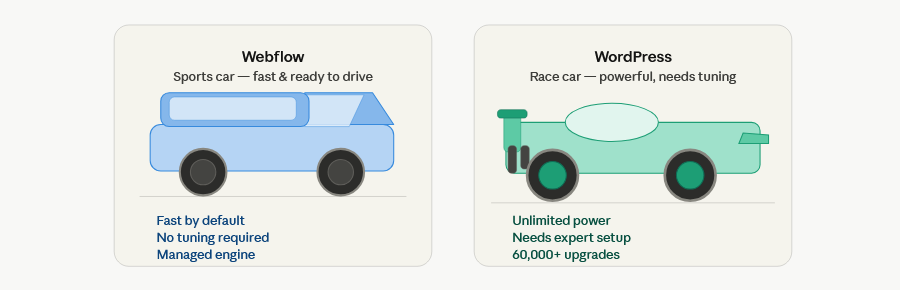
- Webflow = a high-performance sports car. Fast, clean, and reliable — but you don’t modify the engine.
- WordPress = a custom-built race car. Potentially faster and more powerful — but it needs constant tuning and maintenance.
Head-to-Head SEO Comparison
1. Site Speed & Core Web Vitals
Speed is one of Google’s most important ranking factors. Slow sites lose rankings — and users.
Webflow: Webflow hosts on AWS with a global CDN (Fastly) built in. Pages load fast without any configuration. Images are automatically compressed and served in WebP format. Code output is clean and minimal — no bloated plugin scripts slowing things down.
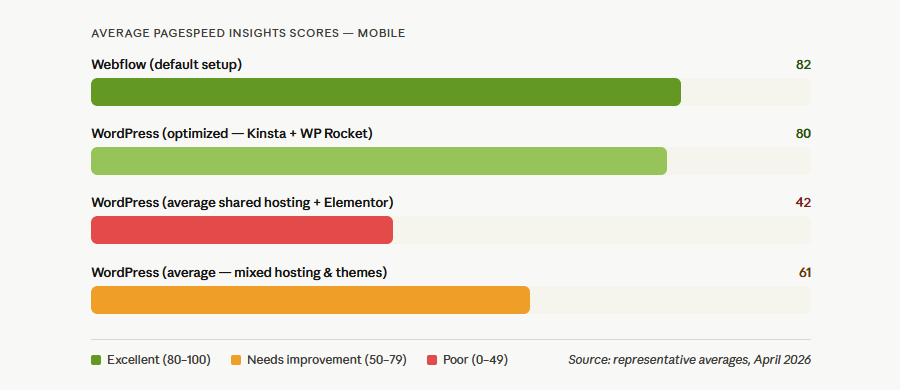
Average Webflow site scores on PageSpeed Insights: 85–95 on desktop, 75–88 on mobile.
WordPress: WordPress speed varies wildly depending on your hosting, theme, and plugins. A poorly configured WordPress site with a bloated page builder (Elementor, Divi) and 40+ active plugins can score as low as 30–50 on mobile PageSpeed.
However, a well-optimized WordPress site — running on a fast host (Kinsta, WP Engine), a lightweight theme (GeneratePress, Kadence), and a caching plugin (WP Rocket) — can match or beat Webflow’s scores.
Winner: Webflow — Fast by default, no configuration required. WordPress can match it, but requires significant technical effort.
2. Technical SEO Control
Technical SEO includes your ability to set meta tags, canonicals, structured data, robots.txt, redirects, and more.
Webflow: Webflow gives you full control over:
- Title tags and meta descriptions (per page and via CMS bindings)
- Canonical URLs (auto-generated, customizable)
- Open Graph and Twitter Card tags
- Robots.txt and noindex settings per page
- 301 redirects (built into the dashboard)
- Custom code injection (head/body, per page or site-wide)
- Auto-generated XML sitemap
The only limitation: structured data (schema markup) must be added manually via custom code. There’s no schema plugin.
WordPress: WordPress offers even more technical control through plugins:
- Yoast SEO / Rank Math handle meta tags, sitemaps, breadcrumbs, and schema automatically
- Full robots.txt editing
- Granular redirect management (with plugins like Redirection)
- Server-level access for
.htaccessmodifications - Complete schema markup libraries via plugins
Winner: Draw — Webflow is cleaner and more reliable out of the box. WordPress offers deeper customization with the right plugins.
3. Content Management & Blogging
Content is still the most powerful SEO strategy. Your platform needs to support a robust content workflow.
Webflow: Webflow’s CMS is powerful for structured content — portfolios, case studies, team pages, product listings. For blogging specifically, it works well with:
- Rich text editor for blog posts
- CMS Collections for categories, tags, and authors
- Dynamic SEO fields bound to CMS data
- Scheduled publishing (with third-party tools)
The main limitation: there’s no native commenting system, and the editor experience isn’t as mature as WordPress’s Gutenberg editor. Large-scale content teams may find the CMS limiting at higher plans.
WordPress: WordPress was built for blogging. The Gutenberg block editor is powerful, flexible, and constantly improving. Content workflows are mature:
- Built-in commenting system
- Multiple user roles and editorial workflows
- Advanced scheduling and draft management
- Content revisions and history
- Thousands of content-focused plugins
For content-heavy sites publishing 5–10+ articles per week, WordPress is the stronger platform.
Winner: WordPress — Especially for high-volume content teams and blogs.
4. On-Page SEO Tools
Webflow: On-page SEO in Webflow is handled manually. There’s no built-in readability checker, keyword density tool, or SEO score indicator. You set your title, meta description, and heading structure yourself — which is actually fine for experienced SEOs, but less helpful for beginners.
Webflow’s CMS does allow you to bind SEO fields dynamically to collection items, which is excellent for large sites with many pages.
WordPress (with Yoast SEO or Rank Math): This is where WordPress shines. Rank Math and Yoast SEO provide:
- Real-time SEO score as you write
- Readability analysis (Flesch-Kincaid score)
- Keyword density checker
- Automatic internal linking suggestions (Yoast Premium)
- Schema markup generator
- Breadcrumb SEO
- Social preview for Open Graph
For beginners and content teams, these tools significantly reduce the chance of on-page SEO mistakes.
Winner: WordPress — Yoast SEO and Rank Math are unmatched for guided on-page optimization.
5. Schema Markup & Structured Data
Schema markup helps Google display rich results — FAQ boxes, star ratings, breadcrumbs, and more.
Webflow: Schema markup requires manual JSON-LD implementation in Webflow’s custom code section. For CMS pages, you can use embed elements with dynamic bindings to auto-populate schema fields. It works — but it requires technical knowledge.
WordPress: Rank Math and Yoast SEO Premium automatically generate schema markup for articles, products, local businesses, reviews, FAQs, and more. No coding required. This is a significant advantage for non-technical users.
Winner: WordPress — Automatic schema generation via plugins is a major time-saver.
6. Mobile SEO & Responsiveness
Webflow: Webflow’s visual editor includes responsive design controls at every breakpoint (desktop, tablet, mobile landscape, mobile portrait). Every element can be adjusted independently at each breakpoint. Sites are responsive by default.
WordPress: Responsiveness depends entirely on your theme. Most modern themes (Astra, GeneratePress, Kadence) are mobile-friendly by default. Page builders like Elementor and Divi add responsive controls. However, poorly coded themes or legacy page builders can create mobile SEO problems.
Winner: Webflow — Responsive design is native and visual, not dependent on theme quality.
7. Hosting, Security & Uptime
Webflow: Webflow provides managed hosting on AWS with Fastly CDN, SSL included, automatic backups, and enterprise-grade uptime (99.99% SLA on higher plans). Security is managed by Webflow — no plugin vulnerabilities or WordPress-specific attacks.
WordPress: WordPress.org (self-hosted) requires you to choose your own host. Quality varies enormously — from shared hosting (slow, insecure) to managed WordPress hosts (Kinsta, WP Engine, Cloudways) that are fast and secure. WordPress is the most targeted CMS by hackers due to its market share, requiring security plugins (Wordfence, Sucuri) and regular updates.
Winner: Webflow — Managed hosting with no security overhead is a significant advantage.
8. E-commerce SEO
Webflow: Webflow’s native e-commerce has basic SEO features — customizable product page meta tags, clean URLs, and Open Graph support. However, it lacks advanced e-commerce SEO features like faceted navigation SEO management, product schema auto-generation, and deep inventory-based SEO.
WordPress + WooCommerce: WooCommerce is the world’s most popular e-commerce platform. Combined with Rank Math or Yoast WooCommerce SEO, you get:
- Automatic product schema (reviews, price, availability)
- Breadcrumb navigation
- Category page SEO
- Product variation SEO
- Advanced faceted navigation with SEO control
Winner: WordPress + WooCommerce — For e-commerce SEO, it’s not even close.
9. International & Multilingual SEO
Webflow: Webflow launched native Localization in 2023, and it’s now mature and well-implemented. It properly handles:
hreflangtags for language targeting- Locale-specific meta tags
- Language-based URL structures
- Per-locale content management
WordPress: WPML and Polylang are the go-to multilingual plugins for WordPress. They’re powerful but complex — and WPML is expensive. When configured correctly, they handle all hreflang, URL structure, and sitemap localization needs.
Winner: Webflow — Native localization is cleaner and easier to implement than WordPress plugins.
10. SEO Migration & URL Management
Webflow: Migrating to Webflow is straightforward with its 301 redirect manager. The bigger challenge is that Webflow’s URL structure can be restrictive — especially for large sites that need complex URL hierarchies.
WordPress: WordPress has full control over URL structures (via Permalinks settings) and supports complex hierarchies. Migration tools and redirect plugins make large-scale migrations manageable. The open-source nature means more migration support tools exist.
Winner: WordPress — More flexibility for complex URL structures and large-scale migrations.
Side-by-Side SEO Comparison Table
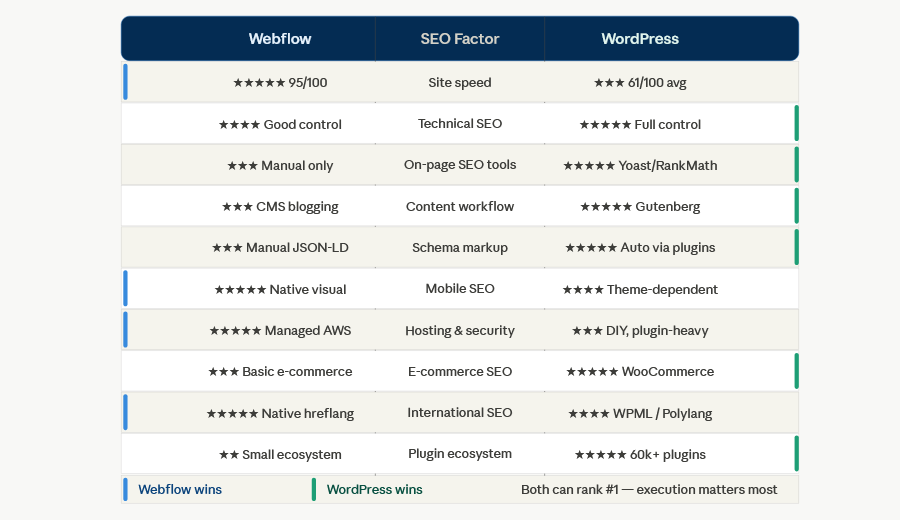
| SEO Factor | Webflow | WordPress |
|---|---|---|
| Site speed (out of the box) | ⭐⭐⭐⭐⭐ | ⭐⭐⭐ |
| Technical SEO control | ⭐⭐⭐⭐ | ⭐⭐⭐⭐⭐ |
| On-page SEO tools | ⭐⭐⭐ | ⭐⭐⭐⭐⭐ |
| Blogging & content workflow | ⭐⭐⭐ | ⭐⭐⭐⭐⭐ |
| Schema / structured data | ⭐⭐⭐ | ⭐⭐⭐⭐⭐ |
| Mobile responsiveness | ⭐⭐⭐⭐⭐ | ⭐⭐⭐⭐ |
| Security & hosting | ⭐⭐⭐⭐⭐ | ⭐⭐⭐ |
| E-commerce SEO | ⭐⭐⭐ | ⭐⭐⭐⭐⭐ |
| International SEO | ⭐⭐⭐⭐⭐ | ⭐⭐⭐⭐ |
| Ease of use for beginners | ⭐⭐⭐⭐ | ⭐⭐⭐ |
| Plugin/tool ecosystem | ⭐⭐ | ⭐⭐⭐⭐⭐ |
| Cost efficiency | ⭐⭐⭐ | ⭐⭐⭐⭐ |
Who Should Use Webflow for SEO?
Webflow is the better choice if you:
- Are a designer, agency, or freelancer building client sites
- Want fast, reliable performance without technical configuration
- Run a portfolio, SaaS marketing site, or lead generation site
- Value clean code and minimal technical debt
- Don’t need a massive plugin ecosystem
- Want managed security and hosting without the overhead
- Are building a multilingual site and want clean localization
- Have a small to medium content operation (1–5 posts per week)
Who Should Use WordPress for SEO?
WordPress is the better choice if you:
- Run a content-heavy blog or news site (publishing daily)
- Need advanced on-page SEO guidance for a non-technical team
- Run an e-commerce store (WooCommerce is unmatched)
- Need maximum plugin flexibility and third-party integrations
- Have complex URL structures or large site architectures
- Want automatic schema markup without coding
- Need deep editorial workflows with multiple authors and roles
- Are on a tight budget (WordPress.org is free; hosting can be $10–30/month)
Real-World Ranking Examples
Both platforms power top-ranking websites across every industry:
Webflow-powered sites ranking well: Many SaaS companies, design agencies, and portfolio sites use Webflow to rank for competitive terms. Webflow’s own site ranks for thousands of design and development keywords.
WordPress-powered sites ranking well: The New York Times, TechCrunch, The White House website, and millions of successful blogs run on WordPress — ranking for some of the most competitive keywords on the web.
The platform doesn’t determine your ranking. Your content quality, backlink profile, and technical SEO execution do.
The Verdict: Which Platform Wins for SEO in 2026?
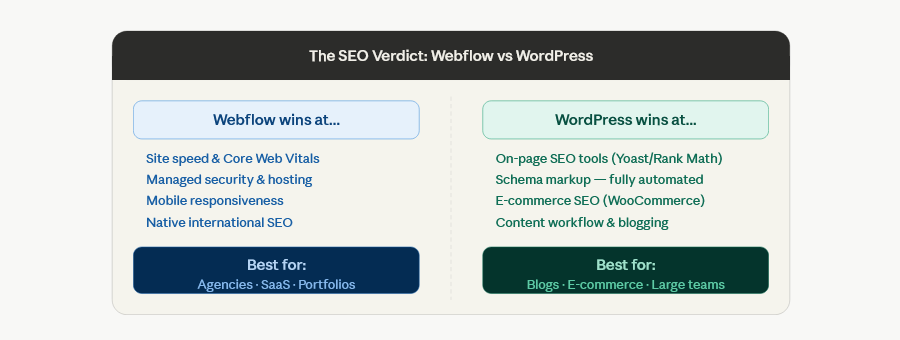
Webflow wins for: Technical SEO out of the box, site speed, security, responsiveness, and localization.
WordPress wins for: Content management, on-page SEO tools, schema automation, e-commerce, and plugin ecosystem.
Our recommendation:
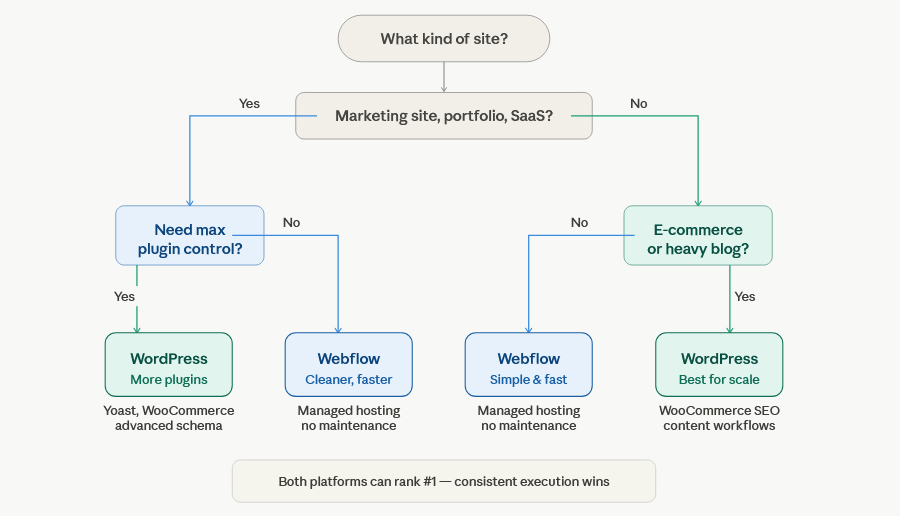
- Choose Webflow if you’re building a marketing site, portfolio, or agency site and want reliable performance without technical overhead.
- Choose WordPress if you’re running a content-heavy operation, e-commerce store, or need maximum plugin flexibility.
Neither platform is objectively “better” for SEO. The best platform is the one your team can execute on consistently — because consistent, high-quality content always beats platform advantages.
Pro Tips: Getting the Most SEO from Either Platform
For Webflow:
- Use CMS collection bindings for all SEO meta fields — never hard-code them
- Add JSON-LD schema manually to every key page type
- Connect Google Search Console and PageSpeed Insights from day one
- Use Webflow’s Finsweet Attributes library for CMS filters without JS conflicts
- Compress images before upload (Webflow handles WebP conversion, but start with clean files)
For WordPress:
- Use a lightweight theme (GeneratePress, Astra) — not Divi or Elementor on shared hosting
- Install Rank Math (free) over Yoast for better out-of-the-box schema support in 2026
- Use WP Rocket or LiteSpeed Cache for performance
- Run your site on a managed WordPress host (Kinsta, WP Engine, or Cloudways)
- Keep plugins under 20 — every plugin adds load time and attack surface
FAQ: Webflow vs WordPress for SEO
Is Webflow better than WordPress for SEO?
Neither is definitively better. Webflow has better default performance and cleaner code. WordPress has better content tools and a richer SEO plugin ecosystem. Your SEO results will depend more on your strategy and execution than on the platform itself.
Can Webflow replace WordPress for SEO purposes?
For many use cases — yes. If you’re running a marketing site, portfolio, or SaaS landing page, Webflow can fully replace WordPress for SEO. For content-heavy blogs and e-commerce, WordPress still has advantages.
Does WordPress have better SEO plugins than Webflow?
Yes. Yoast SEO and Rank Math have no equivalent in Webflow. They offer real-time on-page analysis, automated schema markup, and guided optimization that Webflow simply doesn’t provide natively.
Which platform loads faster — Webflow or WordPress?
Webflow is faster by default due to its managed CDN and clean code output. A well-optimized WordPress site can match or exceed Webflow’s speed, but it requires caching plugins, a fast host, and a lightweight theme.
Is Webflow good for blogging and content SEO?
Webflow works for blogging, but WordPress is stronger for content-heavy operations. If you publish more than a few posts per week and have a content team, WordPress’s editorial tools and workflow are superior.
Which is more cost-effective for SEO?
WordPress.org is free (hosting costs $10–100/month). Webflow plans start at $14/month for basic sites and go up to $39+/month for CMS features. For large e-commerce or enterprise sites, costs are similar. For tight budgets, WordPress wins on cost.
Conclusion
The Webflow vs WordPress SEO debate doesn’t have a universal winner — it has the right answer for your specific situation.
If you want a fast, visually polished site with solid SEO foundations and minimal maintenance, Webflow is your platform.
If you need a content powerhouse with maximum flexibility, mature blogging tools, and automated SEO guidance, WordPress is your platform.
The good news: both can rank #1. The platform is the tool — your strategy, content quality, and consistency are what drive rankings in 2026 and beyond.
Ready to take action? If you’re on Webflow, check out our Webflow SEO Checklist (2026) for a complete step-by-step optimization guide. If you’re on WordPress, make sure Rank Math is installed and your Core Web Vitals are green.